Skip to content

Selected work

Space Transfers

A DTF print-on-demand platform that turns complex artwork preparation, sheet packing, checkout, fulfilment, and delivery into one coordinated product experience.

Role

Product Design & Development

Year

2026

Duration

Ongoing

Category

Platform
https://space-transfer.vercel.app
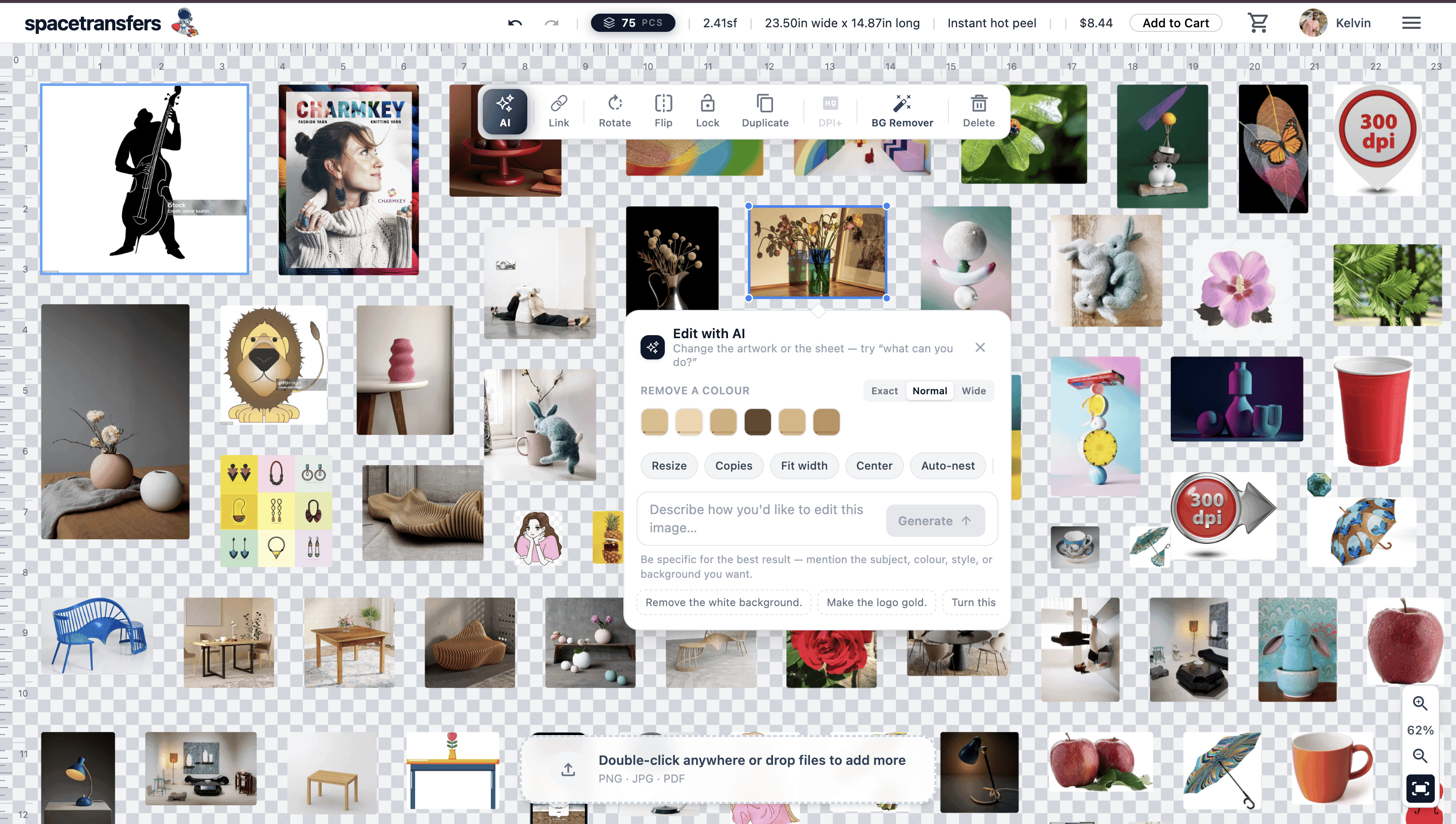
Space Transfers gang-sheet canvas editor

The situation

DTF printing is sold by the sheet, so profitability depends on how efficiently artwork fits onto film. Shops were arranging sheets manually in general-purpose design tools, wasting production time and material while creating files printers still had to inspect before use.

Product strategy

Research revealed one connected service rather than a standalone editor: customers need to prepare artwork and understand price, operators need to manage orders and capacity, and fulfilment partners need production-ready files with clear next actions. The product architecture links those needs through one shared order lifecycle while giving each role an interface shaped around its own decisions.

The artboard

The centrepiece is a direct-manipulation canvas rather than a conventional form. Users drag artwork onto a live sheet, resize and arrange pieces, inspect print DPI, and see dimensions, quantity, and pricing update immediately. Selection controls stay contextual, while background removal, colour removal, crop, and generative edits remain inside the same workspace.

Interaction model

The editor balances professional control with progressive disclosure. A focused empty state introduces the first action, contextual tools appear only after selection, and system feedback distinguishes loading, processing, validation, success, and recoverable errors. Auto-nesting provides a fast default while preserving manual control for experienced users.

Packing the sheet

Auto-nesting uses a MaxRects-style free-rectangle packer, supported by spatial-grid collision lookups and viewport-culled rendering. The technical model is translated into visible product feedback: users see pieces settle into place, sheet dimensions and price recalculate, and clear status messaging explains when a large operation is still processing.

Service blueprint

Customer, operator, and fulfilment experiences run as coordinated applications over a shared Express API. An order moves from quote through payment, partner assignment, printing, label generation, tracking, and delivery. Shared status language and role-specific actions keep every participant aligned without exposing internal complexity.

Design & development architecture

01User ResearchWorkflow interviews, competitor analysis, print-shop pain points, and opportunity mapping
02Information ArchitectureRole-based navigation for customers, operators, and fulfilment partners across one order lifecycle
03Interaction DesignDirect manipulation, drag-and-drop artwork, selection controls, live feedback, and recoverable actions
04Design SystemReusable canvas controls, status patterns, tokens, components, and responsive platform guidelines
05React + TypeScriptTyped component architecture for the editor, commerce flows, and role-specific interfaces
06Canvas RenderingViewport culling, spatial indexing, zoom controls, and responsive artboard performance
07Express + MongoDBShared API, order lifecycle, partner assignment, payouts, and guarded document storage
08Gemini + StripeAI-assisted artwork preparation and secure checkout integrated into the product journey

What was hard

Problem

A professional canvas editor can overwhelm first-time customers with controls, print rules, and unfamiliar production terminology.

Resolution

Used progressive disclosure, contextual actions, clear empty states, and live DPI, size, piece-count, and price feedback to keep the primary workflow understandable.

Problem

Auto-nesting degraded as sheets filled up. Testing every new piece against every placed item made large gang sheets feel unresponsive.

Resolution

Combined a MaxRects-style packer with spatial-grid collision lookups and viewport-culled rendering, preserving immediate visual feedback on complex sheets.

Problem

Customers, platform operators, and fulfilment partners needed the same order to remain understandable and current across separate applications.

Resolution

Designed one shared status model and paired it with synchronized services, consistent state language, role-specific actions, and timely notifications.

Built with

FigmaUX ResearchUI DesignDesign SystemPrototypingReactTypeScriptCanvasExpressMongoDBGeminiStripe

Links

Live platformOpen project
Availability Live in production